
Introduction — Why Metering Matters
Have you ever shot a beautiful sunset only to find the sun burned white or your subject turned into a silhouette? Or taken a portrait where skin tones look muddy? That’s usually a metering problem, not a creative failure. Metering controls how your camera interprets the scene’s brightness. With a little knowledge and practice, you can turn metering from a guessing game into a reliable tool that helps you make the look you want.
What Is Metering? (Quick Definition)
Metering is the process by which a camera measures available light and recommends exposure settings (shutter speed, aperture, ISO). Modern cameras use different algorithms and sensor regions to evaluate a scene; those options are what we call metering modes. In short: metering tells the camera what part of the scene matters most when deciding exposure.
Types of Metering Modes
Most cameras offer several metering modes. The main ones are Evaluative (Matrix), Center-weighted, Spot, and Partial / Highlight-weighted. Each mode “looks” at different parts of the scene or weighs them differently when calculating exposure. Let’s break them down.
Evaluative / Matrix Metering
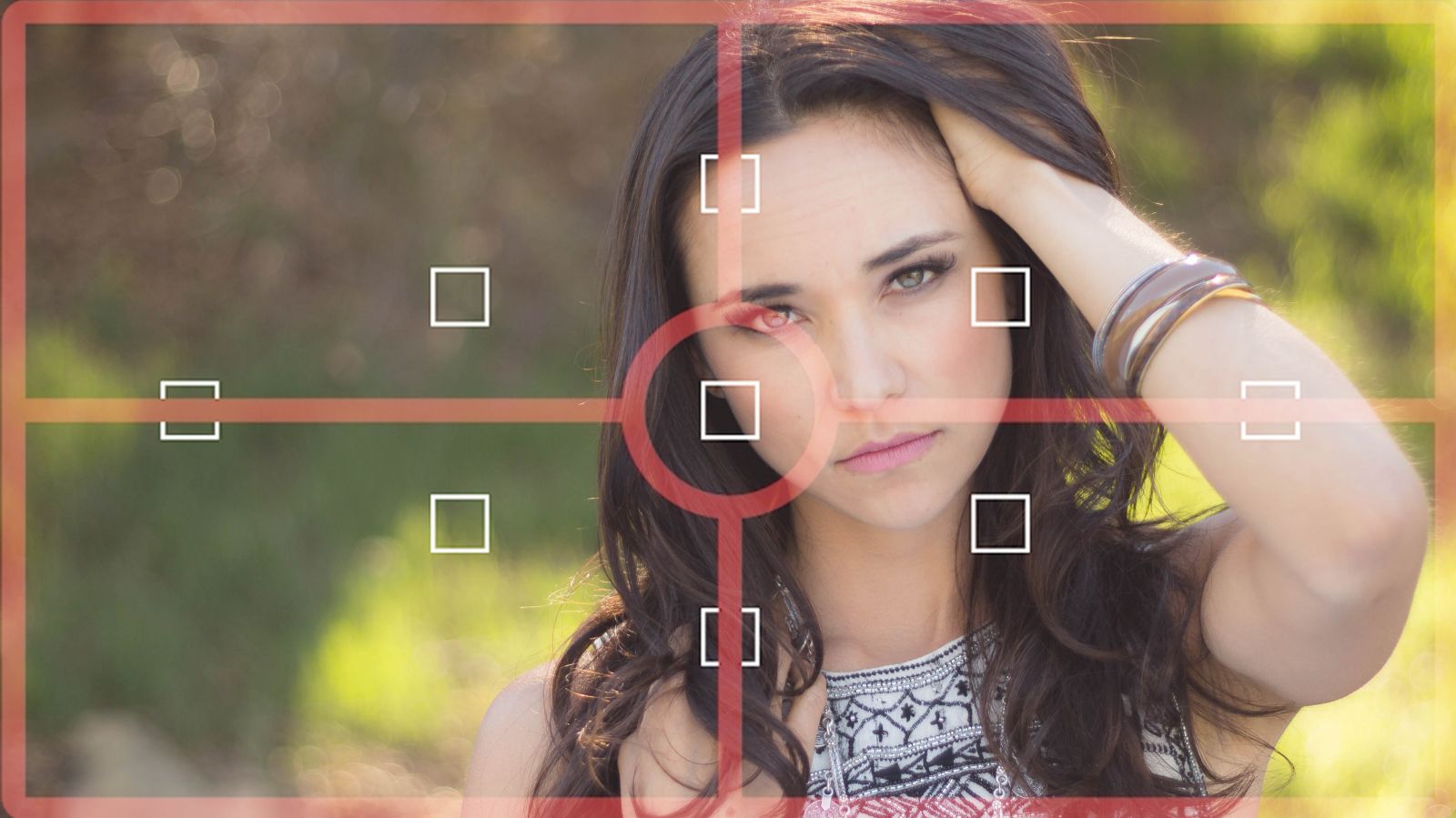
What it does: The camera divides the frame into many zones and uses an algorithm to calculate exposure based on combined information — including focus point, color, and tone. It’s the camera’s “best guess” for most situations.
Analogy: Think of evaluative metering as asking the whole class for their opinion, then averaging the answers.
When to use: Everyday shooting, walk-around, street photography, situations where you want a quick, balanced exposure without babysitting the settings.
Center-weighted Metering
What it does: This mode gives priority to the central area of the frame while still considering the rest. The center typically gets more weight (e.g., 60–80%).
Analogy: It’s like paying most attention to the lead actor on stage while still glancing at the background.
When to use: Portraits, where you want the subject properly exposed but the background can be slightly less important; when the main subject sits near the center.
Spot Metering
What it does: The camera meters a tiny area (often 1–5% of the frame) — usually linked to either the center or your selected AF point — and ignores the rest.
Analogy: Spot metering is a laser pointer for exposure: you tell the camera exactly which small patch matters.
When to use: High-contrast scenes, backlit subjects, tricky light where you need precise control (e.g., expose for a face against a bright sky).
Partial & Highlight-weighted Metering
Partial metering is larger than spot but still focuses on a central area (maybe 10–15%). Highlight-weighted (found on some cameras) specifically tries to preserve highlights by biasing exposure to avoid blown-out bright spots.
When to use: Partial for close portraits or macros where spot is too small; highlight-weighted for concerts, backlight, sunrise/sunset where preserving highlight detail is critical.
When to Choose Each Mode (short guide)
- Evaluative/Matrix: most casual and mixed scenes.
- Center-weighted: classic portraits or subjects near the middle.
- Spot: precise control (bright window behind subject, wildlife against sky).
- Partial/Highlight-weighted: to protect highlights or when intermediate areas matter.
How Metering Actually Works (TTL, sensors, and algorithms)
Modern cameras measure light through the lens (TTL) via dedicated metering sensors or by sampling the imaging sensor. The camera’s firmware runs algorithms that consider patterns, color, and even focus points. Some systems also use scene recognition and subject-detection (faces, animals) to weigh exposures. Keep in mind: the camera is making an educated guess, not reading your artistic intent. That’s why human inputs like metering mode, exposure compensation, and AE-lock exist.
Choosing Metering Modes for Common Scenarios
Landscape & Wide Scenes
Recommended Mode: Evaluative/Matrix.
Why: The camera averages across the frame and tends to deliver balanced exposures for varied tones. For bright skies, consider exposing for the sky first and then blend exposures (HDR or graduated ND filters) if needed. If your scene contains an extreme bright or dark patch, bracket exposures.
Portraits & Skin Tones
Recommended Mode: Center-weighted or spot (linked to face AF) depending on background contrast.
Pro tip: If your subject’s face is darker than the background, use spot on the face or apply positive exposure compensation. Skin tones are sensitive — check highlight clipping on eyes and nose.
Backlit Subjects & Sunsets
Recommended Mode: Spot metering for the subject (if subject matters) or evaluative with exposure compensation to keep the sky dramatic.
Tip: If you want a silhouette, meter for the sky (let the subject fall into shadow). If you want details in the subject, spot-meter the subject’s face and add fill (flash or reflector) if needed.
Snow, Beach & Bright Scenes
Recommended Mode: Evaluative + exposure compensation (+1 to +2 stops) or highlight-weighted where available.
Why: Cameras often try to render scenes as “middle gray” — snow or sand tricks the meter into underexposing. Compensate to keep whites bright.
Low Light, Night & High-Contrast Scenes
Recommended Mode: Spot or evaluative with bracketing. Use a tripod, open aperture, and raise ISO when needed. For city scenes with bright highlights, shoot raw and protect highlights by checking histogram.
Exposure Compensation, AE-Lock & Recompose Tricks
Exposure compensation tells the camera to bias exposure brighter or darker than the meter suggests. Combine it with AE-Lock (Auto-Exposure Lock) to lock a reading then recompose. For example, spot-meter a face, press AE-L (or half-press the shutter if your camera links AF+meter), hold the lock, recompose, and shoot — you’ve taken control of exposure while keeping your composition. This trick is gold for portraits and backlit scenes.
Reading the Histogram — Make the Meter Useful
Don’t blindly trust the meter. Use the histogram to see if highlights are blown or shadows crushed. A right-skewed histogram = risk of blown highlights; left-skewed = underexposed. When in doubt, underexpose slightly and recover in RAW — but beware of noise in shadow recovery. Metering + histogram = smarter exposure decisions.
Practical Step-by-Step Exercises to Practice Metering
- Aperture-priority test: Pick a static, mixed-contrast scene. Shoot in evaluative, then center-weighted, then spot (same composition). Compare histograms and images.
- Backlight practice: Shoot a subject with the sun behind them. Try meter-for-sky, meter-for-subject, add fill flash or reflector, and compare.
- Snow/Beach test: Photograph bright snow/sand and experiment with +0.7 to +2 stops compensation.
- Spot with AF point: Link spot metering to different AF points and see how the camera exposes for the active point. This trains you to rely on the AF-area → spot link.
Common Metering Mistakes to Avoid
- Blind trust: Assuming the camera always “knows best.” It doesn’t know your artistic intent.
- No histogram check: Shooting without verifying highlight/shadow clipping.
- Forgetting compensation: Not adjusting when scenes are dominantly bright or dark.
- Changing modes mid-shoot: Forgetting you switched metering mode and getting inconsistent results. Keep a habit of checking your dial.
Advanced Tips: Custom Metering, Spot Linked to AF, and Flash
- Custom metering: Some cameras let you define a custom metering area (useful for specialized work).
- Spot linked to AF point: Link spot metering to active AF point so your exposure follows your focus — invaluable for off-center subjects.
- Flash metering: TTL flash meters the scene differently. When you mix ambient and flash, use flash exposure compensation and consider manual flash for consistent results.
Metering with Flash & Auto ISO Interaction
When Auto ISO is enabled, the camera can alter ISO to satisfy the metered exposure — this interacts with flash exposure and TTL calculations. If you want consistent flash-to-ambient ratios, consider manual ISO or manual flash power. Also check whether your camera meters flash separately (i.e., pre-flashes) — this affects TTL behavior in tricky lighting.
Quick Metering Cheat Sheet
- Street / Walk-around: Evaluative/Matrix.
- Portrait (controlled): Center-weighted (or spot on face).
- Backlit subject: Spot on subject + AE-lock or evaluate + positive compensation + fill.
- Snow / beach: Evaluative + +1 to +2 stops compensation.
- High contrast / concert: Highlight-weighted (if available) or spot on important highlight.
- Wildlife against sky: Spot on animal’s eye.
Conclusion
That’s Photography Tip 95 in a nutshell: metering modes are not mysterious — they are tools. Master them and you’ll control how the camera “sees” brightness. Practice the exercises above, make note of how different modes react, and combine metering with exposure compensation, AE-lock, and histogram checks. Over time you’ll stop being surprised by blown highlights or dark faces — instead, you’ll plan the exposure like a pro. Ready to try it on your next shoot?
FAQs — 5 Unique Questions
Q1: Which metering mode is best for beginners?
A1: Start with evaluative/matrix — it’s designed to be a safe default. Once comfortable, experiment with center-weighted and spot for specific scenarios.
Q2: Is spot metering the same as center-weighted?
A2: No. Spot meters a tiny area (very precise); center-weighted considers a larger central area. Spot is for precision; center-weighted is for general emphasis on the middle.
Q3: My camera always underexposes snow photos — how do I fix it?
A3: Use +1 to +2 stops exposure compensation or switch to highlight-weighted metering if available. Snow fools meters into middle gray, so you need to tell the camera to brighten up.
Q4: Should I use spot metering with moving subjects?
A4: Spot metering is great for moving subjects only if your AF point and metering point track the subject. Use back-button focus or continuous AF with spot linked to AF point to improve reliability.
Q5: Does the metering mode change how my flash behaves?
A5: Yes. TTL flash meters separately but will still be influenced by ambient metering settings and Auto ISO. For predictable flash-to-ambient balance, consider manual flash power or use flash exposure compensation.
Discover expert photography tips, tutorials, and inspiration at CameraTale.com – your go-to hub for mastering the art of photography.
From beginners to pros, CameraTale.com helps you capture stunning shots with practical advice, gear guides, and creative techniques.